KV Cache Explained: Prefill, Decode, Context Windows & Why LLMs Need So Much Memory
The invisible memory consumer behind first-token latency, slow long chats, and out-of-memory crashes, explained from first principles.
Imagine you have just purchased a high-end GPU with 24GB of VRAM. You load a well-optimized 8B model; the weights take up a modest 16GB, leaving 8GB to spare. Everything runs smoothly. Then you paste in a long PDF, or continue an hour-long coding session with hundreds of lines of context. Your system freezes. The terminal outputs a fatal error: Out of Memory. Your application crashes.
You did not load any new model weights. The neural network did not grow larger. So where did those 8 gigabytes go?
The answer is the KV cache, the most misunderstood component in LLM inference. Understanding it explains nearly every puzzling behavior in local AI: why the first token takes longer than expected, why long conversations gradually slow to a crawl, and why context windows have physical memory limits rather than just software ones.
- Prefill: the model reads your entire prompt before generating anything. The longer the prompt, the longer you wait for the first word.
- Decode: the model generates one token at a time. Speed here depends on how fast your hardware can move data, not how fast it can calculate.
- KV Cache: a temporary memory store that saves the model's understanding of past tokens so it does not have to re-read the whole conversation on every step. It grows as you chat.
- For short conversations, the model weights use most of your memory. For long ones, the KV cache takes over, and that is what causes crashes mid-conversation.
- What Is the KV Cache?
- The Real Cost of Generating a Token
- Prefill vs Decode
- Why the First Token Is Slow
- What Is Actually Stored in the KV Cache
- KV Cache vs Model Weights
- Why LLMs Need So Much Memory
- Context Window Memory Costs
- Why Long Conversations Become Slower
- Flash Attention vs KV Cache
- Prefill vs Decode by Use Case
- KV Cache Compression
- Why This Matters for Local AI
- Visual Walkthrough
- Common Misconceptions
- FAQ
What Is the KV Cache?
The KV (Key-Value) Cache is a dynamic, temporary memory bank that LLMs use to speed up text generation. As a model processes your prompt and generates a response, it performs billions of calculations to understand how every token relates to every other token: a mechanism called self-attention.
Without optimization, the model would recalculate these relationships from scratch for every new token it generates. For a conversation with 5,000 tokens, generating the 5,001st token would require recomputing the relationships across all 5,000 previous tokens. This creates an O(N²) computational problem that would make practical AI inference prohibitively expensive.
The KV cache solves this by saving the intermediate results: the "Keys" and "Values" from the attention mechanism, in GPU memory. Instead of recomputing history, the model looks it up. The tradeoff: speed at the cost of VRAM.
The Real Cost of Generating a Token
A language model is not a brain that reads sentences. It is a deterministic mathematical engine that performs massive matrix multiplications to predict one token at a time. Here is what happens for every single token generated:
- Tokenization: Your text is split into tokens (subword units each assigned a numeric ID. "Hello, world" becomes
[Hello] [,] [world].) - Embeddings: Each token ID is mapped to a high-dimensional vector representing its meaning in the model's learned concept space.
- Transformer Layers & Self-Attention: Inside each layer, every token computes how much "attention" it should pay to every other token. The word "bank" in "the bank of the river" learns to attend strongly to "river" rather than "money".
- Output Distribution: After all layers, the model produces a probability score over its entire vocabulary (tens of thousands of tokens) and selects the highest-scoring candidate.
This entire process runs once per token. A 500-word response requires hundreds of iterations of this pipeline. The KV cache exists to make that repetition practical.
Prefill vs Decode
LLM inference has two fundamentally distinct phases with different hardware bottlenecks. Nearly every performance behavior (slow startup, sluggish generation, OOM errors at long context) traces back to understanding how these phases interact.
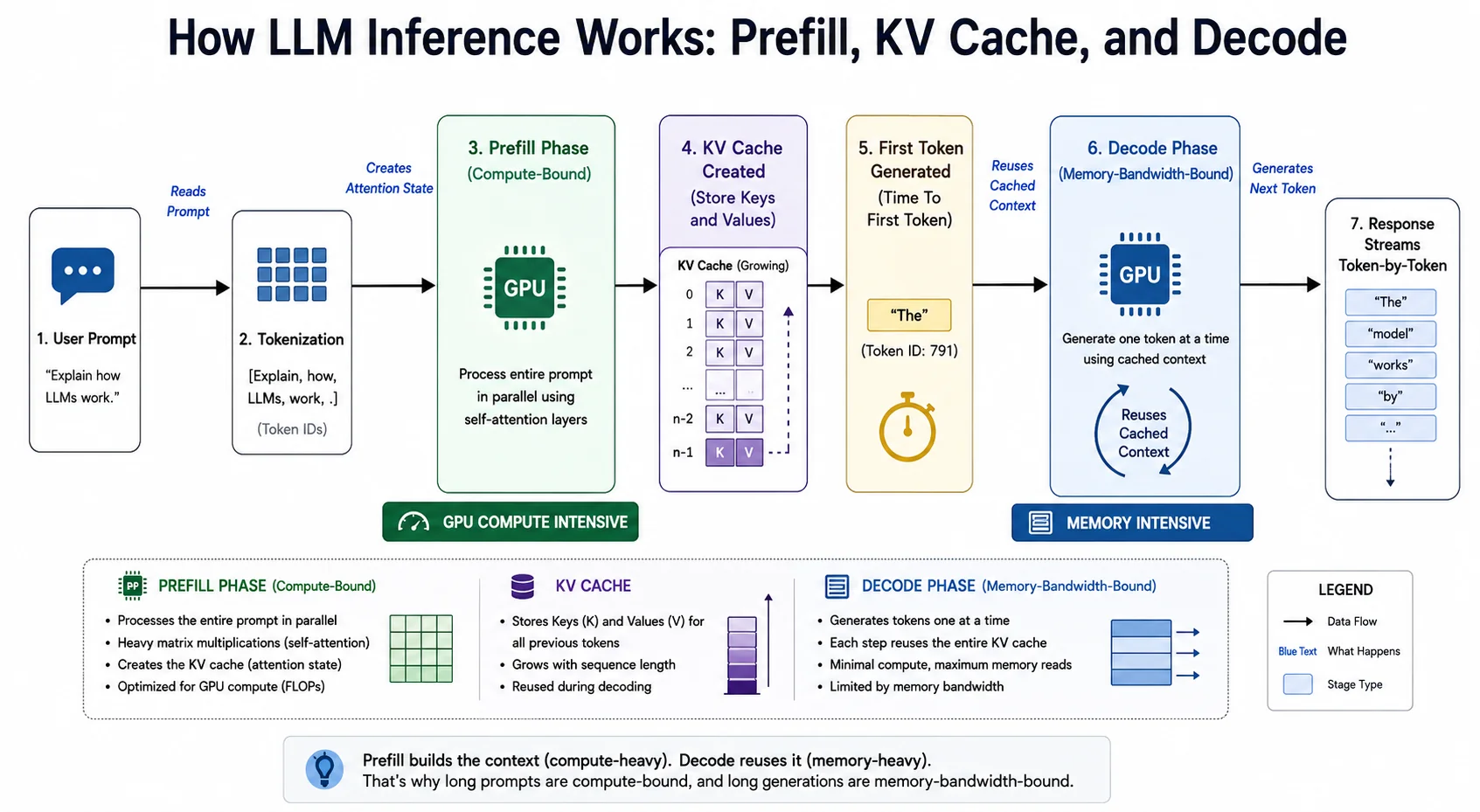
The LLM Inference Pipeline: Prefill processes the full prompt in parallel; Decode generates tokens sequentially using the KV cache.
When you submit a prompt, the model processes all tokens simultaneously. GPUs thrive on parallel operations, so compute utilization spikes toward 100%. The goal is twofold: understand the full context of your prompt, and produce the very first output token. Because all prompt tokens are processed in parallel, Prefill is compute-bound; its speed is limited by the GPU's raw TFLOPS, not its memory bandwidth.
Once the first token is produced, the model enters Decode. Language models generate autoregressively, one token at a time, each depending on all previous tokens. This phase cannot be parallelized. To generate each new token, the GPU must load the full model weights from VRAM into its compute cores, perform a small amount of math, and read the KV cache to calculate attention over all prior tokens. Because of this constant high-volume data movement, Decode is memory-bandwidth-bound; its speed is limited by how fast VRAM can transfer data (GB/s), not by TFLOPS.
Why the First Token Is Slow
The noticeable pause after hitting Enter, before the AI starts typing, is called Time to First Token (TTFT). It is a direct consequence of the Prefill bottleneck.
During Prefill, every token must mathematically compare itself against every previous token. The workload scales quadratically:
| Prompt Length | Scenario | Prefill Complexity | User Experience |
|---|---|---|---|
| 100 tokens | Short question | ~10,000 comparisons | Instant first token |
| 1,000 tokens | Code snippet or document | ~1 million comparisons | Noticeable pause (~1s) |
| 10,000 tokens | Long PDF or codebase | ~100 million comparisons | Visible wait (several seconds) |
| 100,000 tokens | Full book or large repo | ~10 billion comparisons | Long processing delay |
This is why RAG (Retrieval-Augmented Generation) architectures retrieve only the most relevant chunks rather than feeding entire documents into the prompt, reducing Prefill cost dramatically.
What Is Actually Stored in the KV Cache
Inside each transformer layer, the self-attention mechanism uses three components: Query (Q), Key (K), and Value (V), to determine how tokens should relate to one another.
Think of a conference room. You are searching for a database expert (your Query). Everyone wears a name tag listing their expertise (their Key). When your Query matches someone's Key, you listen to their contribution (their Value).
When the model processes a token, it computes Q, K, and V for that token. Here is the key insight: the Keys and Values of past tokens never change. Only the new token needs a new Query. So the model stores the K and V matrices for every prior token in VRAM, and each new Query simply looks up against that growing database. This is the KV cache.
KV Cache vs Model Weights
Confusing these two is the most common mistake in LLM memory planning. They are fundamentally different in nature:
| Feature | Model Weights | KV Cache |
|---|---|---|
| Purpose | Long-term knowledge and reasoning | Active working memory for the current conversation |
| Nature | Static, read-only after training | Dynamic, grows with every token generated |
| Size | Fixed (e.g., 16GB for an 8B model at 4-bit) | Variable, scales linearly with context length |
| Shared across users? | Yes, all users share the same weights | No, each conversation has its own unique cache |
| Analogy | A lifetime of education and expertise | Notes taken on a notepad during a meeting |
This distinction matters in production: if you host a 70B model, the weights are shared across all users. But a user uploading a 50,000-word document consumes gigabytes of VRAM for their unique KV cache, while a user asking a one-line question consumes almost nothing. Cache memory scales per-user; weight memory does not.
Why LLMs Need So Much Memory
VRAM consumption during inference comes from four distinct sources. For most developers, only the first two matter in practice:
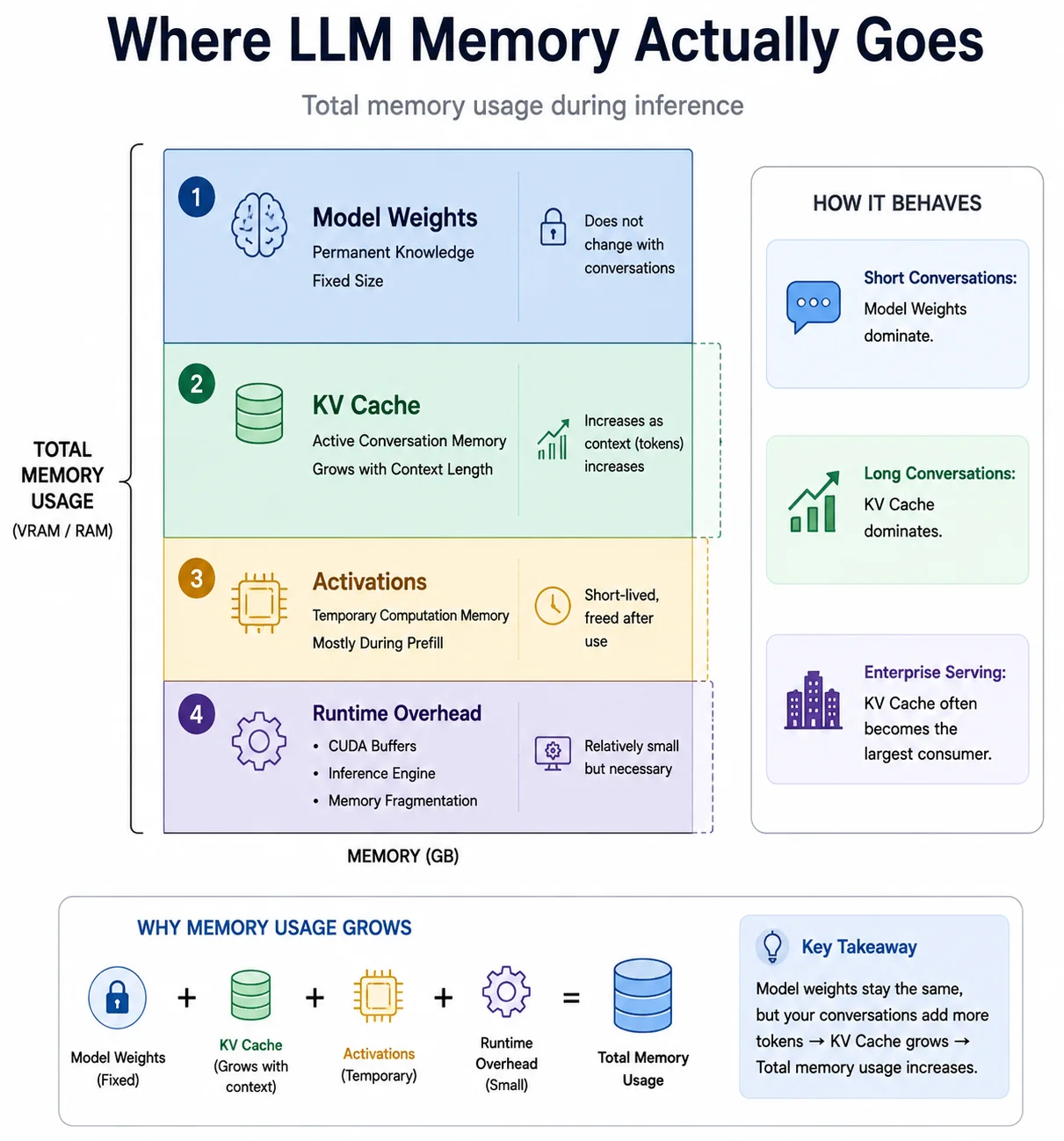
Where LLM memory goes: weights are the fixed cost, the KV cache is the variable one that grows with every token.
- Model Weights: The AI's permanent knowledge. A fixed cost determined by model size and quantization. A 32B model at 4-bit uses roughly 20GB regardless of conversation length.
- KV Cache: The AI's active working memory. Dynamic, scales linearly with the number of tokens in your context window. This is what causes OOM errors mid-conversation.
- Activations: Temporary tensors used during the forward pass. These spike massively during Prefill (when all prompt tokens are processed simultaneously) and then largely disappear during Decode.
- Runtime Overhead: Memory consumed by the inference engine (llama.cpp, vLLM, Ollama) for CUDA contexts, memory fragmentation buffers, and batching infrastructure. Typically 0.5–2GB depending on the engine.
Context Window Memory Costs
Every token in your prompt and every token the model generates adds a new Key-Value entry to the cache. The context window limit is not an arbitrary software setting; it reflects the physical memory available for the cache to grow into.
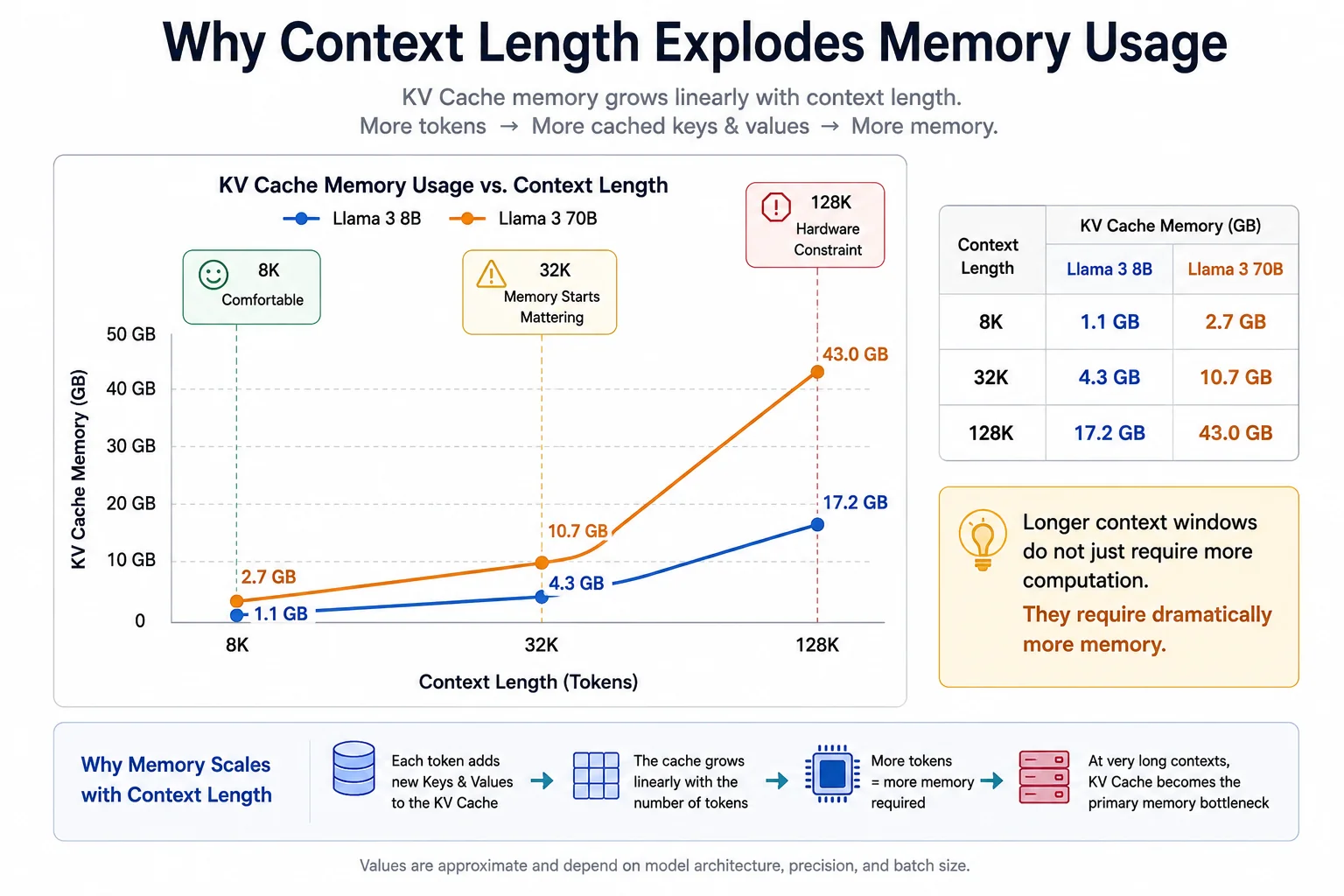
KV cache memory grows linearly with context length. At 128K tokens, the cache for an 8B model exceeds the model weights themselves.
How Much Memory Does One Token Use?
For Llama 3 architecture models using GQA and 16-bit precision:
| Model | Layers | KV Heads | Head Dim | Per-Token Cache |
|---|---|---|---|---|
| Llama 3 8B | 32 | 8 | 128 | ~131 KB |
| Llama 3 70B | 80 | 8 | 128 | ~327 KB |
The formula: 2 (K+V) × 2 bytes (fp16) × layers × kv_heads × head_dim. For Llama 3 8B: 2 × 2 × 32 × 8 × 128 = 131,072 bytes per token.
How the Cache Scales with Context
| Tokens | Scenario | Llama 3 8B Cache | Llama 3 70B Cache |
|---|---|---|---|
| 8K | Short coding session | ~1.1 GB | ~2.7 GB |
| 32K | Long document or extended chat | ~4.3 GB | ~10.7 GB |
| 50K | Short book or large codebase | ~6.5 GB | ~16.3 GB |
| 128K | Full book or enterprise knowledge base | ~17.2 GB | ~42.9 GB |
At 128K context, the Llama 3 8B KV cache (17GB) exceeds the model weights themselves. Running Llama 3 70B at full 128K context requires budgeting over 40GB of VRAM purely for conversation memory.
What Context Window Can Your Hardware Handle?
Practical context limits when running a quantized 8B-class model (~5GB weights) and reserving room for the KV cache:
| Hardware | Practical Context Window | Typical Use Case |
|---|---|---|
| 16GB RAM / VRAM | 4K – 8K tokens | General chat, short coding assistance |
| 32GB RAM / VRAM | 8K – 32K tokens | RAG pipelines, long document summarization |
| 64GB unified memory | 32K – 64K tokens | Multi-document analysis, large codebases |
| 128GB+ workstation | 64K – 128K+ tokens | Full-scale book analysis, enterprise serving |
- GQA adoption: Models without GQA consume cache memory significantly faster than the figures above.
- Weight quantization: Running a 4-bit model instead of 16-bit frees more VRAM headroom for the cache.
- KV cache quantization: Enabling 8-bit or 4-bit cache compression can double or quadruple these practical limits.
Why Long Conversations Become Slower
A 20-message chat feels snappy. A 500-message chat feels sluggish. The mechanism is straightforward once you understand Decode phase dynamics.
During Decode, token generation speed is bounded by memory bandwidth. To produce each new token, the GPU must not only load the model weights but also stream the entire KV cache through its compute cores to calculate attention scores over all prior tokens.
As your conversation grows to 30,000 tokens, the KV cache might occupy 10GB. To generate each token, the GPU must read that 10GB across the memory bus. At 20 tokens per second, that means attempting 200GB of cache reads every second, quickly hitting the physical memory bandwidth ceiling. Token generation speed measurably degrades as the cache grows.
Flash Attention vs KV Cache
These two optimizations are often confused because both relate to the attention mechanism. They solve entirely different problems:
| Optimization | What It Solves | Phase Affected | What It Does |
|---|---|---|---|
| Flash Attention | Activation memory explosion during Prefill | Prefill | Standard attention materializes an N×N matrix in VRAM (32K context = 32,000×32,000 entries, instant OOM). Flash Attention computes attention in small SRAM blocks, avoiding this. It saves computation memory, not cache memory. |
| KV Cache | Redundant recomputation during Decode | Decode | Stores Keys and Values from past tokens so the model does not re-run attention over them on every step. It saves compute time at the cost of persistent VRAM. |
Flash Attention and KV Cache complement each other: Flash Attention makes long Prefill feasible, KV Cache makes long Decode practical. Modern inference engines use both.
Prefill vs Decode by Use Case
Depending on what you are building, the hardware bottleneck shifts entirely. Optimizing the wrong phase wastes infrastructure spend:
Users care primarily about Decode throughput; text should stream smoothly at a readable pace. A fast Time to First Token improves perceived responsiveness, but sustained streaming speed is what defines the user experience. Optimize for memory bandwidth.
You feed the model a large document (50K-token Prefill) and ask for a short summary (100-token Decode). The Decode phase is nearly free. Prefill throughput is the absolute bottleneck. Optimize for TFLOPS and consider chunked prefill strategies.
Tools like Copilot send background requests containing your entire codebase (long Prefill) and need autocomplete suggestions immediately (fast Decode). Both phases must be fast. This is the hardest infrastructure profile to optimize for simultaneously.
Systems like vLLM use continuous batching (in-flight batching) to overlap work. Because Prefill is compute-bound and Decode is memory-bound, the engine can process User A's Prefill while simultaneously running User B's Decode, maximizing GPU utilization. This requires careful tradeoff management between latency, throughput, and cache memory allocation.
KV Cache Compression
Because the KV cache grows so large, AI researchers have developed dedicated compression techniques. Note that standard model quantization (GGUF, AWQ, GPTQ) compresses model weights; it does not compress the KV cache, which defaults to 16-bit precision unless explicitly configured otherwise.
KV Cache Quantization
The most practical technique for local AI users. By reducing the numerical precision of stored Keys and Values:
| Method | Memory Reduction | Quality Impact | Availability |
|---|---|---|---|
| 8-bit KV Cache (FP8) | 50% reduction | Negligible | llama.cpp -ctk q8_0 -ctv q8_0 |
| 4-bit KV Cache (INT4) | 75% reduction | Minor on most tasks | llama.cpp, vLLM, LM Studio |
TurboQuant
A more advanced technique from Google DeepMind, presented at ICLR 2026. TurboQuant uses a two-step approach: first, a randomized Hadamard transform spreads outlier values across dimensions, making quantization easier. Second, the Quantized Johnson-Lindenstrauss (QJL) transform removes the bias this introduces. The result is KV cache compression to 3-bit precision with near-zero accuracy loss, achieving roughly 6x memory reduction, making 128K+ context windows practical on consumer hardware that previously could not support them. Early llama.cpp community implementations are already available. See our detailed TurboQuant breakdown for a full explanation.
Why This Matters for Local AI
If you run models locally with Ollama, llama.cpp, LM Studio, or Open WebUI, the KV cache directly determines your stability, speed, and maximum context length.
- Ollama: The
num_ctxparameter in your Modelfile controls the pre-allocated context window size. Setting it to 128K on a 16GB machine will cause immediate OOM. Match this value to your hardware. For 16GB, 4K–8K is a safe starting point for most models. - llama.cpp: The
-cflag defines the pre-allocated KV cache size. Enable 8-bit KV caching with-ctk q8_0 -ctv q8_0; this is one of the highest-impact single-flag optimizations available and is particularly valuable on MacBooks and 24GB GPUs. - LM Studio: Provides a "Context Length" slider and options to enable Flash Attention and KV cache quantization. Do not slide context length to the maximum without checking your available headroom; the UI does not warn you before an OOM crash.
- General rule: If you experience a model that starts fast but degrades over a long session, the KV cache is the culprit. Either reduce
num_ctx, enable cache quantization, or use a smaller model to free more headroom.
Visual Walkthrough: One Prompt, Start to Finish
Here is what actually happens when you type: "Write a poem about a cybernetic forest."
Common Misconceptions
VRAM capacity determines your maximum context window; it controls how much conversation history the model can hold in its KV cache. Intelligence is determined by the model weights. More VRAM means longer memory, not deeper reasoning.
Context length is a physical memory constraint. Setting
num_ctx=128000 on a 16GB machine will allocate more KV cache than the available VRAM and immediately crash. The limit is real, not arbitrary.
Weight quantization shrinks the model footprint at load time. If the OOM error occurs mid-conversation as context grows, the KV cache is the cause, not the weights. You need KV cache quantization (
-ctk q8_0) or a reduced context window, not weight compression.
Frequently Asked Questions
The KV cache is a temporary memory bank where an LLM saves its intermediate mathematical results: the "Keys" and "Values" of the attention mechanism, for every past token. By storing these, the model avoids recomputing the entire conversation history each time it generates a new word, trading VRAM for speed.
Prefill is the initial reading phase where the model processes your entire prompt in parallel; it is compute-bound (limited by TFLOPS) and determines Time to First Token. Decode is the generation phase where the model produces one token at a time using the KV cache; it is memory-bandwidth-bound (limited by GB/s) and determines how fast text streams to your screen.
Before generating any output, the model must process your entire prompt simultaneously during Prefill. Every token compares itself against every other token, scaling quadratically. A 10,000-token prompt requires millions of matrix multiplications, creating a noticeable delay before the first word appears. This is called Time to First Token (TTFT).
For short conversations, model weights dominate. For long contexts, the KV cache often overtakes them. A Llama 3 8B model at 128K context requires roughly 17GB for the KV cache alone, more than the model weights. In production inference systems with many concurrent users, the cache is frequently the single largest memory consumer.
Every token you send and every token the model generates gets appended to the KV cache as a new Key-Value pair. The longer the conversation, the physically larger the cache grows in VRAM. Once the cache fills your remaining VRAM, the system either crashes or falls back to much slower system RAM offloading.
You successfully loaded the Model Weights into VRAM but left insufficient headroom for the KV Cache to grow. The weights are a fixed cost; the cache is dynamic. As the conversation lengthens, the cache fills the remaining VRAM until the system crashes. Always leave 20–30% of VRAM empty after loading a model.
GQA is an architectural optimization where multiple Query heads share a single Key and Value head. In older Multi-Head Attention models, every head stored its own K-V pairs, causing the cache to explode in size. GQA reduces the number of stored K-V pairs by up to 8x with minimal quality loss. Most modern models including Llama 3, Qwen 3, and Mistral use GQA, which is a major reason their cache requirements are manageable.
They solve different problems. Flash Attention reduces the temporary activation memory used during Prefill by computing attention in blocks rather than materializing a full N×N matrix. KV Cache reduces redundant recomputation during Decode by storing and reusing past Key-Value pairs. Flash Attention saves Prefill memory; KV Cache saves Decode compute.
As the KV cache grows, the GPU must load the entire cache across its memory bus to calculate attention for each new token. A 30,000-token conversation might produce a 10GB KV cache. At 20 tokens per second, the GPU must read that 10GB cache 20 times every second, quickly saturating memory bandwidth and causing measurable slowdowns.
Standard weight quantization (GGUF, AWQ, GPTQ) shrinks model weights but does not affect the KV cache, which defaults to 16-bit precision. To reduce cache size you must explicitly enable KV cache quantization: 8-bit halves the memory requirement, 4-bit reduces it by 75%. In llama.cpp, use -ctk q8_0 -ctv q8_0 to enable 8-bit KV caching.
Yes, this is called offloading. However, system RAM bandwidth is far slower than GPU VRAM, which means the memory bus bottleneck during Decode becomes dramatically worse. A model generating 30 tokens per second from VRAM may drop to 1–3 tokens per second when the cache is offloaded to system RAM.
Yes. The KV cache is tied to your active conversation session. When you start a new chat or clear the context, the VRAM allocated to that cache is freed. This is why starting a fresh conversation often immediately improves performance after a long sluggish session.
TurboQuant is a KV cache compression technique from Google DeepMind, presented at ICLR 2026. It applies a randomized Hadamard transform followed by the Quantized Johnson-Lindenstrauss (QJL) method to compress the cache to 3-bit precision with near-zero accuracy loss, roughly 6x memory reduction. This makes very long context windows (128K+) practical on consumer hardware. Early llama.cpp community implementations are already available.
- First-token latency is compute-bound. Prefill requires massive parallel matrix multiplications to process your prompt. Longer prompts mean longer waits.
- Token generation is memory-bandwidth-bound. Decode speed is limited by how fast your GPU can read the KV cache across its memory bus, not by TFLOPS.
- Context length equals physical memory. Every token adds to the KV cache. Exhausting VRAM with a bloated cache is the primary cause of mid-conversation crashes.
- Weight quantization and KV cache quantization are different. Quantizing your model weights frees load-time memory. To survive long contexts, you need KV cache quantization separately.
- GQA and KV compression are what make long contexts practical on consumer hardware. Without them, 128K context windows would require server-grade infrastructure.