Hardware
M5 Ultra 96GB vs M5 Max 128GB for Local LLMs: Which Mac Studio Should You Buy?
A $5,500 dilemma: 1.2TB/s of memory bandwidth, or 32GB more room to load the model at all.
- Capacity and bandwidth solve different problems. The extra 32GB on the M5 Max decides which models fit in memory at all. The M5 Ultra's 1.2TB/s bandwidth decides how fast a model that already fits can generate tokens.
- Buy the M5 Max 128GB if you want to run 100B to 120B parameter models, need long context windows (64K or more), run coding agents that keep multiple models loaded, or want the most future-proof capacity.
- Buy the M5 Ultra 96GB if your workflow lives entirely inside 70B-class dense models or similarly sized MoE models, and your priority is the fastest possible tokens per second.
- The Ultra is not 2x faster. Despite roughly double the bandwidth, kernel overhead and attention compute mean real-world decode speed lands around 40 to 70 percent faster, not double, once a model fits on both machines.
- There is no 128GB Ultra. Apple's base Ultra config is fixed at 96GB; the next memory tier jumps straight to 256GB on a pricier 80-core GPU SKU, about $4,000 more.
- M5 Ultra 96GB vs M5 Max 128GB at a Glance
- What the Extra 32GB Actually Buys You
- What 1.2TB/s Memory Bandwidth Actually Does
- Why LLM Inference Is Different From Normal GPU Workloads
- Prefill vs Decode: Which Hardware Matters?
- How Much Memory Does an LLM Really Need?
- Which LLMs Fit on 96GB and 128GB?
- Dense vs MoE: Why Parameter Count Can Mislead You
- Long Context: Where Memory Capacity Becomes Critical
- M5 Max vs M5 Ultra for AI Coding Agents
- Real-World Benchmark Expectations
- Why There's No 128GB M5 Ultra
- Speed vs Capacity Decision Matrix
- Final Verdict
- Frequently Asked Questions
If you're buying a Mac Studio primarily to run large language models locally, you land on a specific, expensive fork in the road at checkout.
A Mac Studio M5 Max configured with 128GB of unified memory and a 1TB SSD costs $5,400. For $100 more, you can step up to the base Mac Studio M5 Ultra (30-core CPU, 64-core GPU) with a 1TB SSD, which comes with 96GB of unified memory.
Moving to the Ultra gets you a massive jump to 1.2TB/s of memory bandwidth, nearly double the Max's 614GB/s. But your unified memory capacity drops from 128GB to 96GB.
For video editors and 3D artists, the Ultra is usually the easy default choice. For people running local inference with MLX, llama.cpp, or Ollama, memory capacity and memory bandwidth govern two completely different parts of the experience, and picking wrong means either an unusably slow machine or one that simply cannot load the model you wanted.
This guide breaks down what each configuration can actually run, how macOS memory limits and KV cache math change the picture, and which one you should buy. Apple announced both machines on August 25, 2026, with shipping starting September 22, so treat the performance figures below as informed estimates from official specs and known Apple Silicon scaling patterns, not independent third-party benchmarks (see the disclaimer at the end of this guide).
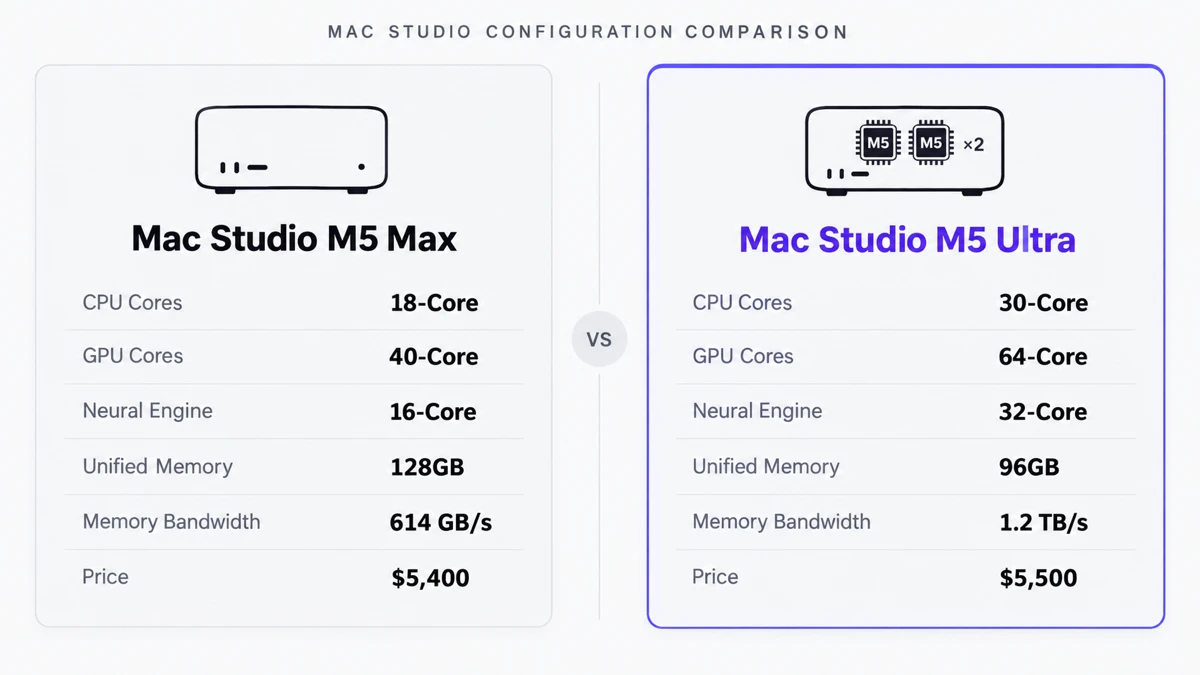
M5 Ultra 96GB vs M5 Max 128GB at a Glance
Apple Silicon uses unified memory, where the CPU, GPU, and Neural Engine all share the same high-speed pool of RAM. Getting 128GB of usable VRAM on a traditional PC setup means chaining multiple enterprise Nvidia GPUs together, easily a $15,000-plus proposition. A single Mac Studio gets you there for a fraction of that.
Here is how the two similarly priced configurations compare:
| Specification | Mac Studio M5 Max 128GB | Mac Studio M5 Ultra 96GB |
|---|---|---|
| Chip architecture | Single SoC | Dual SoC (UltraFusion) |
| CPU cores | 18-core | 30-core (base) |
| GPU cores | 40-core | 64-core (base) |
| Neural Engine | 16-core | 32-core |
| Unified memory | 128GB | 96GB (base) |
| Memory bandwidth | 614GB/s | 1.2TB/s |
| Price (1TB SSD) | $5,400 | $5,500 |
Prices reflect standard US Apple Store configurations with matching 1TB storage, current as of the August 25, 2026 announcement.
This isn't a simple "double the compute" upgrade. The base Ultra offers 1.6x the GPU cores and roughly 1.95x the memory bandwidth of the Max, at a 25 percent cut to memory capacity.
What the Extra 32GB Actually Buys You
In local AI, unified memory is real estate. The extra 32GB on the M5 Max buys you:
- Larger model weights. You can load 100B-plus to 120B-plus parameter models at Q5 or Q6 quantization, sizes that are mathematically impossible to fit into 96GB without heavy swapping.
- Bigger context windows. Feeding in a large codebase or a 200-page PDF requires a large KV cache. The extra 32GB of headroom lets you push context length to 128K or 256K on large models.
- Concurrent models. You can keep a 70B model loaded for reasoning alongside a 14B model for fast tool-calling without unloading either one.
- System stability. macOS itself needs unified memory for background tasks, your IDE, and display output. 128GB means inference doesn't starve the rest of the system.
What 1.2TB/s Memory Bandwidth Actually Does
If capacity determines what you can run, bandwidth determines how fast it generates text.
The M5 Ultra's 1.2TB/s bandwidth buys you:
- Higher decode throughput. During generation, the GPU has to read the model's active weights for every single token it produces. A wider memory bus streams those weights faster.
- Faster multi-user batching. If you're hosting a local API serving several users at once, extra bandwidth keeps the GPU from stalling while it waits for data.
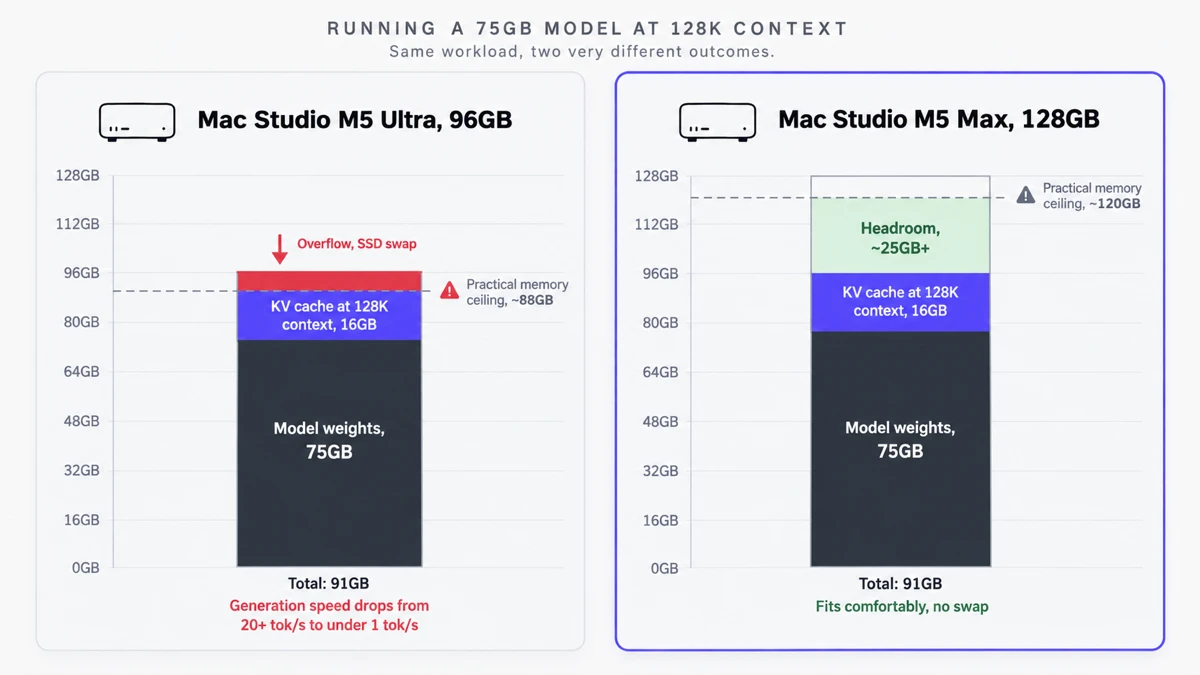
But bandwidth cannot make up for a lack of capacity. If a model is too large for 96GB, the Ultra is forced to swap weights to SSD. Once that happens, generation speed collapses from 20-plus tokens per second to less than 1 token per second. 1.2TB/s of bandwidth is worthless if the data it needs to move isn't sitting in RAM.
Why LLM Inference Is Different From Normal GPU Workloads
Don't buy a Mac Studio for local LLMs based on video editing or 3D rendering benchmarks. The bottleneck is a different one entirely.
Traditional rendering is compute-bound: the GPU performs heavy math on a relatively small amount of data. LLM generation flips that. The math itself (mostly matrix multiplication) is comparatively simple, but the sheer volume of data moving from RAM to the GPU is enormous.
That's why an M5 Max with "only" a 40-core GPU can still generate tokens quickly. The primary bottleneck is usually how fast the 614GB/s memory bus can feed the GPU, not how fast the GPU itself can crunch numbers.
Prefill vs Decode: Which Hardware Matters?
LLM inference happens in two distinct phases, and understanding both is central to picking the right machine.
1. Prefill (prompt processing)
When you paste 5,000 lines of code into a prompt, the model has to process all of it before it outputs the first word.
- The bottleneck: prefill is compute-intensive. It leans heavily on GPU cores, attention mechanism efficiency, and Neural Accelerators, though it still requires memory bandwidth to stream the prompt data in.
- The hardware advantage: the Ultra's 64-core GPU and 32-core Neural Engine process large prompts noticeably faster than the Max, producing a shorter time-to-first-token when running an optimized framework like MLX.
2. Decode (token generation)
Once the prompt is processed, the model generates text one token at a time.
- The bottleneck: decode is heavily constrained by memory bandwidth.
- The hardware advantage: the Ultra's 1.2TB/s bandwidth gives it a real edge, but only if the model fits in memory. 2x bandwidth doesn't translate to 2x tokens per second: kernel launch overhead and attention compute (which scales with context length) mean the Ultra typically lands 40 to 70 percent faster than the Max for models that fit comfortably on both.
How Much Memory Does an LLM Really Need?
A common misconception is that a 96GB Mac gives you 96GB to work with for your model. It doesn't.
macOS actively limits how much memory can be "wired" (locked in place) for the GPU, to keep the system stable. Power users can override the default dynamic limit with the terminal command sudo sysctl iogpu.wired_limit_mb, but hard physical ceilings still exist, since the OS has to hold onto memory for kernel operations and display buffering.
- M5 Ultra 96GB: the practical ceiling for AI allocation is roughly 85GB to 88GB before the system swaps to SSD or becomes unstable.
- M5 Max 128GB: the practical ceiling is roughly 115GB to 120GB.
Your real footprint comes down to this:
Total memory used = Model weights + KV cache + runtime framework buffers
If a quantized model weighs 82GB, it loads fine on a 96GB machine. But the moment you start chatting, the KV cache grows, pushes the total past 88GB, and generation speed collapses.
Which LLMs Fit on 96GB and 128GB?
Here's how representative models fit on each machine in practice. "Comfortable" means plenty of room for 32K-plus context. "Tight Fit" means short context only.
| Model | Architecture | Quantization | Weights | M5 Ultra 96GB | M5 Max 128GB |
|---|---|---|---|---|---|
| Llama 3.1 70B | 70B dense | Q4_K_M | ~42GB | Comfortable | Comfortable |
| Llama 3.1 70B | 70B dense | Q8_0 | ~75GB | Tight Fit | Comfortable |
| Qwen 2.5 72B | 72B dense | Q6_K | ~59GB | Comfortable | Comfortable |
| Llama 4 Scout | 109B MoE | Q4_K_M | ~58GB | Comfortable | Comfortable |
| Mistral Large | 123B dense | Q4_K_M | ~73GB | Tight Fit | Comfortable |
| Command R+ | 104B dense | Q6_K | ~86GB | Impractical | Comfortable |
| GPT-OSS 120B | 120B dense | Q5_K_M | ~83GB | Impractical | Comfortable |
Weight sizes are estimated from standard MLX/GGUF quantization footprints for each model family.
Dense vs MoE: Why Parameter Count Can Mislead You
Notice the gap between dense models (like Llama 70B) and Mixture of Experts models (like Llama 4 Scout, 109B).
In a dense model, every parameter is used to generate every token. In an MoE model, the total footprint might be 109B parameters, but only a fraction (say, 17B) actually activates for any given token.
MoE models are fast to run because the active compute is low, but all the weights still have to sit in memory somewhere. That's why capacity matters even for a highly optimized MoE model: you still need the unified memory "parking lot" to hold hundreds of billions of inactive parameters, even if you're only touching a fraction of them per token.
Long Context: Where Memory Capacity Becomes Critical
The KV cache is the memory space an LLM uses to remember your conversation history, the system prompt, and any documents you've uploaded. "The model fits" is not the same claim as "the model fits comfortably at the context length I actually want to use." As context length grows, the KV cache grows with it.
For a modern 70B-class model using Grouped Query Attention (GQA), rough KV cache requirements look like this:
- 8K context: ~1GB to 1.5GB KV cache
- 32K context: ~4GB to 5GB KV cache
- 128K context: ~16GB to 20GB KV cache
This is where the 96GB Ultra can bite you. Run an 8-bit quantized 70B model (75GB of weights) on a 96GB Ultra and it flies for the first few turns. Feed it a 128K-context document and the KV cache adds another 16GB. 75GB plus 16GB is 91GB, over the practical wired-memory ceiling, and the machine swaps to SSD or freezes. The 128GB Max, running the same setup, still has roughly 25GB of headroom left.
M5 Max vs M5 Ultra for AI Coding Agents
Local AI coding agent workflows increasingly run a large reasoning model (100B-plus) for logic, alongside a smaller routing model (around 8B) that handles tool calls and terminal execution concurrently.
For this pattern, the M5 Max 128GB is the better machine. Running concurrent models means all of them have to sit in RAM at the same time: an 80GB main model plus a 10GB routing model already consumes 90GB, before you've loaded any actual codebase context. The 96GB Ultra can't sustain that setup without running into context window exhaustion. The 128GB Max handles multi-model stacks without the same pressure, leaving room for large codebase ingestion.
Real-World Benchmark Expectations
Apple doesn't publish official tokens-per-second figures for third-party LLMs, but MLX profiling trends across the Apple Silicon lineage point to some reasonably confident expectations:
- Models under 65GB (for example, Llama 70B at Q4): the M5 Ultra 96GB should be the clear winner. Its 1.2TB/s bandwidth should let it generate tokens 40 to 70 percent faster than the Max, and its 64-core GPU should process prefill substantially faster too.
- Models between 75GB and 85GB: expect the two machines to trade blows. The Ultra should still lead at prefill, but as it nears its memory ceiling, macOS memory compression can kick in and cause inconsistent decode speed. The Max should be slower but steadier.
- Models over 85GB: the M5 Max 128GB wins by default, since the Ultra simply cannot load them without SSD swap.
Why There's No 128GB M5 Ultra
If you've been searching for a 128GB Ultra configuration, you're not alone, and it's worth explaining why one doesn't exist. Apple's base M5 Ultra (30-core CPU, 64-core GPU) ships fixed at 96GB. There is no way to add memory to that specific chip configuration. The next memory tier up is 256GB, but it's only available on a different, more expensive Ultra SKU with a 36-core CPU and 80-core GPU, priced about $4,000 higher than the base Ultra.
That leaves a real gap for anyone who wants exactly 128GB with Ultra-class bandwidth: it simply isn't a purchasable configuration. If 128GB is your actual requirement, the M5 Max is currently the only way to get it, and you'd be giving up the Ultra's bandwidth advantage to do so.
Speed vs Capacity Decision Matrix
| Priority | Better choice | Why |
|---|---|---|
| Largest model that fits | M5 Max 128GB | Physically accommodates ~115GB of weights plus KV cache. |
| Highest decode speed | M5 Ultra 96GB | 1.2TB/s bandwidth pushes 40 to 70 percent higher tok/s on smaller models. |
| Long context (64K+) | M5 Max 128GB | Provides the 15GB-plus headroom massive KV caches need. |
| 70B-class models | M5 Ultra 96GB | Fits comfortably in 96GB, letting the Ultra maximize speed. |
| 120B-class models | M5 Max 128GB | 96GB requires aggressive, lower-quality quantization to run 120B. |
| Coding agents | M5 Max 128GB | Safely runs a reasoning model, a routing model, and a codebase together. |
Final Verdict
If you're forced to choose between the M5 Ultra 96GB and the M5 Max 128GB for serious local LLM work, the M5 Max 128GB is the safer, more broadly capable buy for most people.
The M5 Ultra is a genuine engineering achievement, but its 96GB ceiling is a real architectural constraint. In a moment where 120B-class models and 64K-plus context windows are becoming standard for agentic coding and complex reasoning, 96GB runs out of room faster than it looks like it should on paper.
The Ultra's 1.2TB/s bandwidth will make anything that fits run brilliantly fast. But the Max's 128GB gives you the room to actually load the smartest available models, work with long documents, and run the multi-model agent setups that are a big part of what makes local AI useful in the first place.
Frequently Asked Questions
Is 96GB enough for local LLMs?
Yes, for models in the 70B to 80B parameter range, such as Llama 3.1 70B or Qwen 2.5 72B, 96GB is excellent and leaves the Ultra's 1.2TB/s bandwidth free to maximize generation speed. It struggles once you need 120B-plus parameter models at high quantization, or large context windows on top of a large model, since the practical usable ceiling is closer to 85 to 88GB once macOS reserves memory for itself.
Is 128GB better than 96GB for LLMs?
For model capacity and context length, yes. 128GB on the M5 Max lets you run 120B-class models, keep two models loaded at once for agentic workflows, and support much larger KV caches for long documents or codebases, all without swapping to SSD. The 96GB M5 Ultra wins on raw generation speed for models that comfortably fit within its memory.
Is the M5 Ultra twice as fast as the M5 Max for LLMs?
No. The Ultra has roughly double the memory bandwidth (1.2TB/s vs 614GB/s), but real-world decode speed does not scale 1:1 with bandwidth because of kernel launch overhead and attention compute costs. Expect the Ultra to generate tokens around 40 to 70 percent faster than the Max, provided the model fits entirely inside its 96GB of memory.
Why isn't there a 128GB M5 Ultra option?
Apple's base M5 Ultra configuration (30-core CPU, 64-core GPU) is fixed at 96GB. The next memory tier jumps straight to 256GB, but only on the higher 36-core CPU, 80-core GPU Ultra SKU, which costs about $4,000 more. There is no way to buy an Ultra with 128GB. If you specifically want 128GB, the M5 Max is currently the only path to it.
What LLMs can run on an M5 Ultra 96GB?
The base M5 Ultra 96GB comfortably runs 70B-class dense models like Llama 3.1 70B and Qwen 2.5 72B at Q4 to Q6 quantization, along with mid-sized MoE models like Llama 4 Scout. 8-bit quantizations of 70B models fit but leave little room for long context, and models above roughly 85GB will not fit at all without SSD swap.
What LLMs can run on an M5 Max 128GB?
The 128GB M5 Max comfortably runs everything the 96GB Ultra can, plus larger models such as Mistral Large 123B and Command R+ 104B at Q4 to Q6 quantization, while still reserving 15 to 25GB of headroom for long context windows or a second, smaller model running alongside it.
Does memory bandwidth matter for LLM inference?
Yes, substantially. Memory bandwidth mainly determines decode speed, the rate at which the model generates tokens one at a time. During decode, the GPU has to stream the model's active weights from memory for every single token, so a wider memory bus directly translates into faster generation, as long as the model already fits in memory.
Is 96GB enough for AI coding agents?
It is workable but tight. Coding agents typically need a large context window to hold codebase content plus a smaller routing model running concurrently for tool calls, and both eat into the same 96GB budget. For agentic coding workflows specifically, 128GB gives meaningfully more headroom before you hit out-of-memory errors.