AI Models
Can You Run DeepSeek V4.1-Flash Locally? The Real Hardware Requirements
Free to download does not mean it fits on your laptop, or even your workstation.
- The 552B parameter count is real, but misleading. Counting its memory tables too, the model's true footprint is closer to 748 billion parameters, roughly 510GB just to download.
- It is not the older, smaller V4-Flash. A common mix-up leads people to assume this fits on a large-memory Mac. It does not.
- For ordinary PCs and most Macs, the answer is simply no. A 512GB Mac Studio is the strict minimum on Apple Silicon; 64GB, 128GB, 192GB, and 256GB machines cannot load it at all.
- For servers, the entry point is 8 GPUs. Production deployments typically use 8x NVIDIA H200 (about 1,128GB of combined VRAM) plus 512GB or more of separate system RAM.
- Quantizing it further barely helps. The official release already ships heavily compressed, and community tooling for it is still immature.
- For almost everyone, the API is the practical choice. DeepSeek's own hosted pricing is cheap enough that buying local hardware rarely pays for itself.
- What Is DeepSeek V4.1-Flash?
- Why "552 Billion Parameters" Is the Wrong Number to Worry About
- Two Kinds of Memory: The Backbone and the Engram
- So How Much Memory Does It Actually Need?
- The KV Cache Breakthrough: 890 Bytes a Token
- Why You Can't Just Quantize Your Way Out of This
- Can It Run on a Mac? The 512GB Wall
- What About a PC or a Server?
- Local Hardware vs. Just Using the API
- Final Verdict
- Frequently Asked Questions
What Is DeepSeek V4.1-Flash?
DeepSeek V4.1-Flash is a large language model released by DeepSeek on September 10, 2026. It is free to download under the permissive MIT license, supports a huge 1-million-token context window, can natively understand images as well as text, and introduces a genuinely new architecture that DeepSeek calls a Causal Encoder-Decoder, or CED for short. It replaced the earlier V4-Flash model, which DeepSeek has since retired.
On paper, all of that sounds like fantastic news for anyone who wants to run a serious AI model on their own hardware instead of renting time on someone else's servers. In practice, the honest answer to "can I run this myself" depends entirely on what kind of hardware you actually have, and for the overwhelming majority of people, the answer is no.
This guide walks through why, using plain language wherever possible, and ends with the specific hardware tiers that actually work.
Why "552 Billion Parameters" Is the Wrong Number to Worry About
To understand why this model needs the hardware it does, it helps to understand the difference between a "dense" model and a "sparse" one, since DeepSeek V4.1-Flash is built entirely around that distinction.
A dense model is the simple case: every single one of its parameters gets used to process every single word you type. If you run a prompt through a 70-billion-parameter dense model, the GPU does math using all 70 billion of those parameters for every token, whether that token needed all of them or not. Bigger model, more math, every time, no exceptions.
DeepSeek V4.1-Flash is a Mixture-of-Experts model, often shortened to MoE, which works differently. Think of it like a large hospital with hundreds of specialists on staff. When a patient comes in, they are not examined by every single doctor in the building, a receptionist (the model calls this a router) sends them to the two or three specialists actually relevant to their case. The hospital still needs to employ and house all of those specialists, but any one patient visit only involves a handful of them.
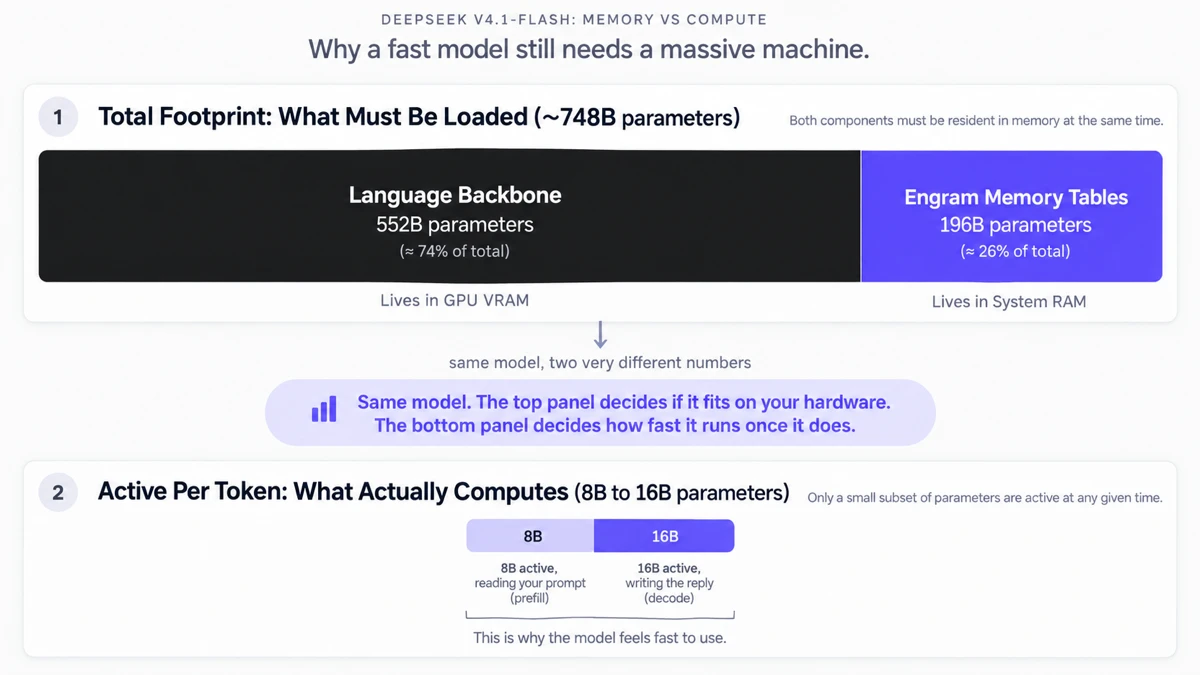
That is exactly the split in DeepSeek V4.1-Flash. The model activates only about 8 billion parameters per token while reading your prompt, and about 16 billion parameters per token while writing its answer. That is why it can generate text so quickly, it is genuinely only doing the computational work of a much smaller, roughly 16-billion-parameter model at any given moment.
But here is the catch that trips people up: the hospital still needs a building big enough to hold every specialist on staff, even the ones not currently seeing a patient. The router might call on any expert at any moment, so all of them, all 552 billion backbone parameters, have to be loaded into memory and ready to go at all times. You get the speed of a small model with the memory bill of a massive one.
Two Kinds of Memory: The Backbone and the Engram
DeepSeek V4.1-Flash's parameters actually split into two genuinely different components, not just one big pile of weights.
- The language backbone (552 billion parameters). This is the core MoE transformer described above, responsible for actually reasoning about your prompt and generating a response.
- Engram conditional memory (roughly 196 billion parameters). This is a separate, massive set of lookup tables built specifically for fast factual recall and routing decisions. Think of it less like part of the "brain" and more like a reference library the model can consult, built from patterns of words (n-grams) rather than learned reasoning.
DeepSeek designed the Engram tables to live in ordinary system RAM (the same kind of memory your computer uses for everyday tasks) rather than expensive GPU memory, since a lookup table does not need the same kind of fast, GPU-adjacent access that active reasoning does. That single design choice is why a real deployment needs large amounts of both regular system memory and GPU memory, not just one or the other.
This backbone-plus-Engram split is also what makes the model's Causal Encoder-Decoder architecture possible. Older, more conventional models are "decoder-only," meaning the same set of layers both reads your prompt and writes the response. DeepSeek V4.1-Flash instead splits its 40 transformer layers into two dedicated halves: a 20-layer encoder whose only job is reading and understanding your prompt, and a 20-layer decoder whose only job is writing the reply. It is a bit like a translator who reads an entire letter first, forms a complete understanding of it, and only then picks up a pen to write the response, rather than translating word by word as they go. That dedicated reading phase is exactly why prefill (processing your prompt) only needs 8 billion active parameters, noticeably less than the 16 billion needed during the writing phase.
So How Much Memory Does It Actually Need?
"The download is 510GB" does not mean "any computer with 512GB of memory can run this comfortably." A real deployment's memory use breaks into a few distinct pieces.
The model weights: about 510GB
If DeepSeek had shipped this model at standard 16-bit precision, the backbone and Engram together would occupy over 1.5 terabytes. Instead, DeepSeek released the official checkpoint already compressed into a mixed FP8 and FP4 numeric format directly from the research team. That brings the official download down to roughly 510GB, split across 48 file shards. This is your absolute floor, the minimum amount of storage and memory needed just to hold the files, before you have processed a single word.
Splitting the load: VRAM versus system RAM
Because the Engram tables are designed to sit in system RAM rather than GPU memory, a real server deployment divides the load: GPUs hold roughly 314GB worth of backbone weights, while the machine's ordinary DDR5 system memory holds the roughly 196GB of Engram tables.
Notice that these gigabyte figures do not just match the 552B and 196B parameter counts from the previous section, and that is expected, not a mistake. Parameter count and file size are different units. The Engram tables happen to land close to 1 byte per parameter, which is why "196 billion parameters" and "196GB" look almost identical. The backbone is compressed more aggressively, with a heavier mix of 4-bit precision, which is why its 552 billion parameters take up only about 314GB rather than something closer to 552GB. Either way, the hardware requirement is not one big number, it is a GPU memory requirement and a separate, equally serious system memory requirement, both of which have to be satisfied at once.
The KV Cache Breakthrough: 890 Bytes a Token
There is one place where DeepSeek V4.1-Flash is dramatically lighter than older large-context models: its KV cache, the working memory a model uses to remember everything said earlier in a conversation so it does not have to re-read the whole thing from scratch on every new word.
In older large-context models, a full 1-million-token conversation could require hundreds of gigabytes of GPU memory just for this running memory, on top of the model weights themselves. DeepSeek re-engineered this using a technique it calls Compressed Sparse Attention 2, combined with a compact FP4 numeric format for the cache and a trick called cross-layer sharing, where only some layers store their own copy of the cache and the rest borrow from them instead of duplicating it.
The result is a KV cache footprint of roughly 890 bytes per token, which sounds like a small technical detail until you see what it means in practice:
- A 128,000-token conversation needs roughly 113 megabytes of cache. That is about the size of a typical mobile app download.
- A full 1-million-token conversation needs under 1 gigabyte of cache.
So while the model itself is enormous, holding a long conversation with it barely adds to the memory bill at all. The hard part of running this model is loading it in the first place, not talking to it once it is loaded.
Why You Can't Just Quantize Your Way Out of This
When a model is "too big," the usual local-AI move is to quantize it: mathematically round its numbers down to a lower precision, often packaged into a community format like GGUF, so it takes up less space, trading a small amount of accuracy for a much smaller footprint. This is normally an effective trick, similar in spirit to how aggressive 3-bit compression techniques can shrink other large models dramatically.
DeepSeek V4.1-Flash makes that trick much less useful, for two reasons:
- It is already heavily quantized. The official 510GB release is already compressed into FP8 and FP4 precision. Most of the "easy" savings a community quantization pass would normally find have already been captured by DeepSeek itself before you ever download it.
- The runtime software has not caught up yet. The model's new architecture (the Engram tables, cross-layer KV sharing, and native FP8 packing) is different enough that popular local inference tools needed real rework to support it. As of mid-September 2026, support in llama.cpp, the tool most home local-AI setups rely on, is still experimental. Community patches can convert the model into the familiar GGUF format, but the underlying engine still lacks the specialized code needed to actually run the converted network correctly.
Even once that tooling matures, there is a hard mathematical ceiling here: you cannot compress a roughly 748-billion-parameter model down to fit on a 128GB or 192GB system without destroying most of what makes it useful in the first place.
Can It Run on a Mac? The 512GB Wall
Apple Silicon Macs use what is called Unified Memory Architecture, where the CPU and GPU share one single pool of physical memory instead of having separate, smaller pools like a typical gaming PC. That design is a big part of why Macs have become genuinely popular for local AI experimentation, and it is the same underlying idea we covered in more depth when comparing Mac Studio configurations for local LLMs.
Here is where the confusion usually starts: the older V4-Flash model was a comparatively modest 166.9GB, small enough that plenty of high-memory Macs could run it. It is easy to assume V4.1-Flash, sharing most of the name, would fit somewhere similar. It does not.
An independent Apple Silicon port of the model, built by a developer group called PipeNetwork using Apple's MLX framework, gives us a real, measured answer instead of a guess. Because the model's cross-layer KV sharing and enormous Engram tables all still have to be resident in memory, the MLX runtime reports a resident memory footprint of about 427GB for stable, coherent generation.
| Mac configuration | Can it run V4.1-Flash? |
|---|---|
| 64GB / 128GB / 192GB | No. Unified memory is far below the weight payload. |
| 256GB Mac Studio | No. Memory is exhausted almost immediately, forcing a crash or a freeze as it pages to disk. |
| 512GB Mac Studio | Yes, but it is the strict minimum, not a comfortable margin, and this specific configuration is not orderable yet. Covers the 427GB resident footprint plus operating system overhead, with little room to spare. Apple lists it as coming in late October, with pricing not yet announced. |
What About a PC or a Server?
Stepping outside Apple's world, a standard PC or server needs both GPU memory (VRAM) and ordinary system memory (Host DRAM) sized correctly, and they have to be counted separately, not added together.
| Hardware | Feasibility | Why |
|---|---|---|
| Consumer PC (up to 256GB RAM, RTX 4090/5090) | Impossible | A consumer GPU tops out around 24 to 32GB of VRAM. It physically cannot hold the model backbone, no matter how much system RAM surrounds it. |
| 2x NVIDIA H200 (282GB VRAM) | Not enough | Enough for the older, smaller V4-Flash, but well short of the roughly 510GB checkpoint V4.1-Flash requires. |
| 4x NVIDIA B200 / B300 | Workable | Reported as sufficient for the backbone specifically by some deployments, though this is a smaller, less universally documented tier than the 8-GPU setup below. |
| 8x NVIDIA H200 | Production standard | Roughly 1,128GB of combined VRAM, the widely verified configuration for real production serving via vLLM or SGLang. |
| Host system RAM (512GB+) | Mandatory regardless of GPUs | The motherboard needs at least 512GB of ordinary DDR5 RAM to hold the Engram tables and coordinate the GPUs, independent of how much VRAM you have. |
On the software side, vLLM and SGLang are the two production-grade runtimes with real support for this architecture today, with SGLang in particular publishing verified deployment recipes for several multi-GPU configurations.
Local Hardware vs. Just Using the API
DeepSeek also offers V4.1-Flash through its own hosted API, and the pricing puts the "should I buy hardware for this" question into sharp focus. During off-peak hours, DeepSeek charges roughly $0.15 per million input tokens and $0.60 per million output tokens (both prices roughly double during peak hours). Third-party providers hosting the same model sometimes charge more, but DeepSeek's own official pricing is the cheapest way to use it.
Compare that to the hardware bill: a maxed-out, currently available Mac Studio configuration already costs $18,299, and the specific 512GB configuration this model needs is not even orderable yet, Apple has it listed as coming in late October with no price announced. A production-grade 8x H200 server runs well past $100,000. For the amount of usage almost any individual developer or small team would generate, the API cost would take an extraordinarily long time to catch up to either of those price tags.
Final Verdict
- Ordinary user or PC builder: No. If you have 64GB, 128GB, or even 256GB of RAM, this model is out of reach on that machine, full stop. Use the API.
- Apple Silicon enthusiast: Only with a genuinely enterprise-grade Mac. A 512GB Mac Studio is the absolute floor, and it is a tight fit even then.
- Enterprise datacenter with multiple GPUs: Yes, and this is really who the model is built for. Once you have paid the steep upfront memory cost, the low active-parameter count and tiny KV cache mean the hardware can then serve enormous numbers of requests extremely quickly.
DeepSeek V4.1-Flash proves that "open weight" and "runs on a laptop" are two completely different claims. By pushing MoE architecture to a roughly 748-billion-parameter total footprint and offloading a huge chunk of it into a separate Engram memory system, DeepSeek built something remarkably fast to talk to, but something that needs serious, genuinely enterprise-grade hardware just to wake up.
Frequently Asked Questions
Can DeepSeek V4.1-Flash run on a normal PC?
No. Even a high-end consumer PC with 256GB of system RAM and an RTX 5090 cannot run it, because the GPU itself only has 24 to 32GB of VRAM, far short of the roughly 510GB the model weights occupy on disk. The bottleneck is GPU memory capacity, not general computing power.
How much RAM does DeepSeek V4.1-Flash need?
The official weights occupy about 510GB on disk, and the model needs all of that resident in memory at once, not just the roughly 8 to 16 billion parameters active per token. On Apple Silicon, independent MLX ports report a resident memory footprint of around 427GB. On servers, expect at least 512GB of system RAM to hold the Engram memory tables, plus enough GPU VRAM to hold the rest.
Can a Mac Studio run DeepSeek V4.1-Flash?
Only the largest configuration, and even that is not fully available yet. A 512GB Mac Studio is the strict minimum, since the MLX port's 427GB resident footprint leaves little headroom below that. 64GB, 128GB, 192GB, and even 256GB Macs cannot run it at all. As of this writing, Apple has not opened orders for the 512GB configuration itself, it is listed as coming in late October, with pricing not yet announced.
Why is DeepSeek V4.1-Flash so large if only 8B to 16B parameters are active?
Active parameters and total parameters measure different things. Active parameters determine how much math the GPU does per token, which is why generation feels fast. Total parameters determine how much memory the model needs, because any of its expert pathways could be called on for the next token, so all of them have to be loaded and ready at once.
Can I run a quantized version of DeepSeek V4.1-Flash on less hardware?
Only partially. The official release is already shipped in a compressed mixed FP8/FP4 format, so most of the usual quantization headroom is already used up. Community-made lower-bit GGUF variants exist and shrink the footprint further, but they still measure in the hundreds of gigabytes, and llama.cpp support for the architecture remains experimental.
What GPUs are needed to run DeepSeek V4.1-Flash on a server?
Production deployments generally use 8x NVIDIA H200 GPUs (about 1,128GB of combined VRAM) or a comparable B200 cluster, run through vLLM or SGLang. Smaller multi-GPU setups have been reported for the model's backbone specifically, but the widely verified production configuration is the 8-GPU tier, plus at least 512GB of separate system RAM for the Engram tables.
Is it cheaper to just use the DeepSeek API instead of running it locally?
For almost everyone, yes. DeepSeek's own API prices V4.1-Flash at around $0.15 per million input tokens and $0.60 per million output tokens during off-peak hours. Buying local hardware is a far bigger commitment: a maxed-out, currently available Mac Studio configuration already costs $18,299, and the 512GB configuration this model actually needs has not even opened for order yet, with pricing still unannounced. A production-grade GPU server runs well past $100,000. For the amount of usage almost any individual developer or small team would generate, the API cost would take an extraordinarily long time to catch up to either of those price tags.
What is the Engram in DeepSeek V4.1-Flash?
Engram is DeepSeek's name for a roughly 196-billion-parameter set of memory tables built for fast factual lookup and routing, separate from the model's main 552-billion-parameter reasoning backbone. It is designed to sit in ordinary system RAM rather than GPU memory, which is why a full deployment needs large amounts of both VRAM and regular DRAM.